


Are your manufacturing sales reps spending more time filling out spreadsheets than closing plant deals? With sales teams spending over three hours a week on manual CRM entry, automation is the easiest way to get your reps back in front of distributors and buyers.
When your team is buried in administrative tasks, they are not visiting clients, calling distributors, or securing new contracts. Automating your CRM data entry is the fastest way to reclaim this wasted time while protecting the accuracy of your sales pipeline.
The hidden costs of manual data entry in manufacturing
For manufacturing companies, a CRM is more than a digital directory. It links your front-end sales pipeline directly to your ERP, supply chain, and production schedules.
When your data entry is manual, both productivity and operations suffer. Sales reps spend up to 27% of their time overall on CRM-related tasks. Specifically, they spend 17.9% of their time inside the CRM itself and 9.1% managing spreadsheets.
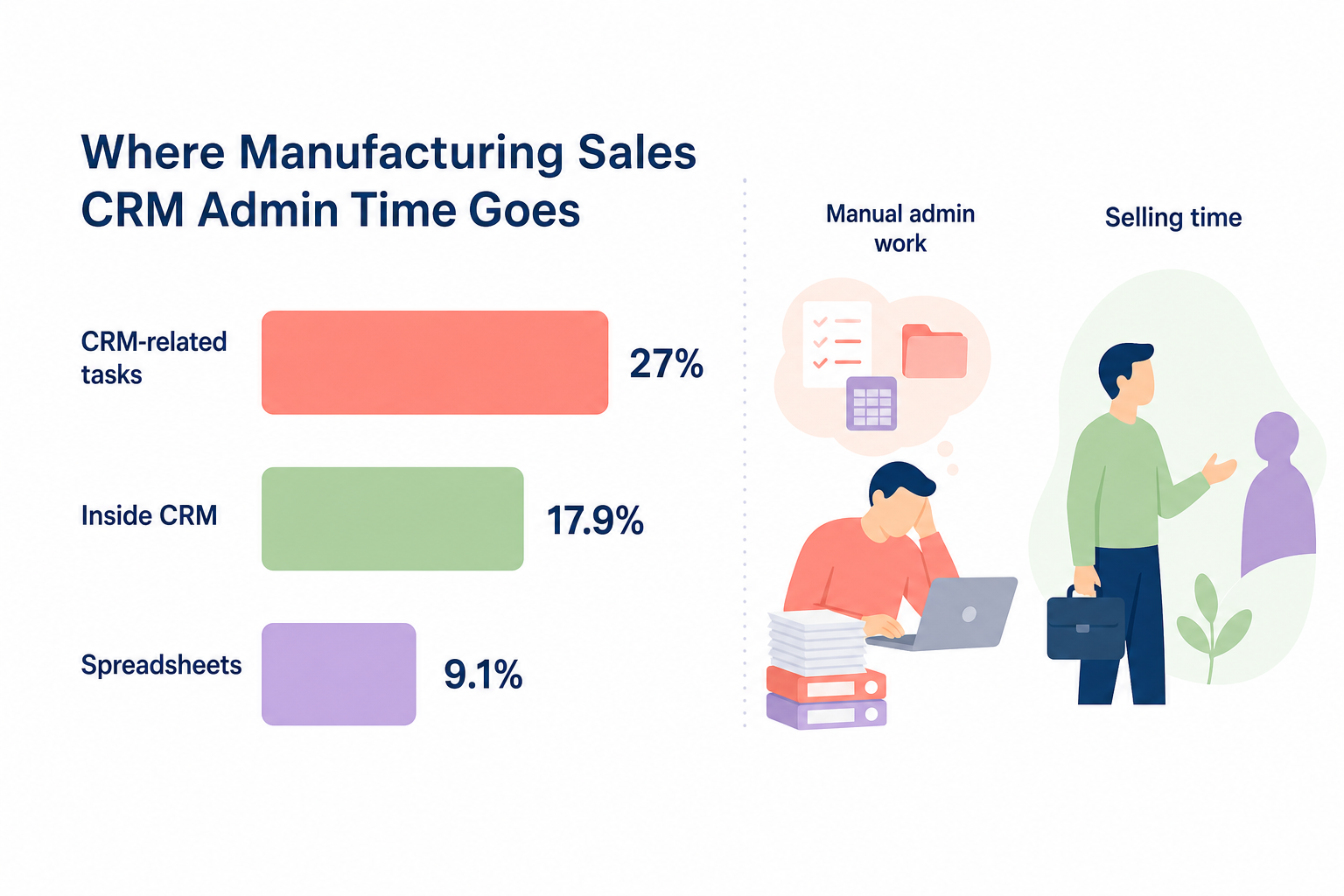
This manual process creates a compounding set of business problems:
- Lost revenue: Poor CRM data quality costs money. The average CRM database is less than 80% accurate, and employees can spend up to 27% of their time correcting dirty data. In fact, 44% of businesses estimate they lose over 10% of their annual revenue due to poor quality data, costing companies an average of $15 million annually.
- Operational bottlenecks: If a sales rep enters an incorrect SKU, an outdated Minimum Order Quantity (MOQ), or a wrong delivery address, it delays production and disrupts shipping.
- Weakened forecasting: Inaccurate sales data makes it impossible to predict raw material demand or plan production runs. This leads to either excess inventory or costly stockouts.
- Compliance and reputational risks: Incorrectly stored customer records can lead to compliance failures under regulations like the UK GDPR, while shipping errors damage distributor relationships.
Three practical methods to integrate your CRM
To eliminate manual data entry, your CRM must communicate automatically with your external sales, marketing, and communication tools. By designing a step-by-step CRM integration for sales, you can build a unified pipeline where customer details sync automatically.
You can connect your sales tools to your CRM in three main ways:
Native integrations
Native integrations are pre-built connectors provided directly by your software vendors. Because they require no coding, they are highly stable and can reduce your system implementation time by up to 60%.
For example, connecting your Outlook or Gmail inbox directly to your CRM allows emails and calendar invites to log automatically. If your team targets commercial distributors, a native LinkedIn CRM sync allows reps to import profiles and log outreach directly within platforms like Salesforce or Microsoft Dynamics.
Middleware and iPaaS tools
If your CRM does not have a native connector to your inventory tool or local accounting software, you can use middleware like Zapier, Make, or MuleSoft. Middleware acts as an automatic translator between two disconnected systems.
This approach is highly effective when integrating CRM with sales tools like Xero or custom quoting portals, allowing you to pass complex lead data automatically without writing code.
Custom APIs
For legacy manufacturing setups running proprietary ERPs or older on-premise databases, custom Application Programming Interfaces (APIs) offer the ultimate flexibility. While APIs require dedicated development resources to build and maintain, they allow you to map highly specific manufacturing data – like Bill of Materials (BOMs) or specialized customer dimensions – directly into your CRM fields.
How to set up automated CRM data flows
Before connecting new software to your CRM, you must establish a clear framework. Connecting tools to a messy database will only create automated chaos.
Follow these five phases to set up your automation safely:
Phase 1: Audit and clean existing data
Before automating anything, audit your database to clean up existing records. This prevents a cycle of “garbage in, garbage out” that can corrupt your reporting, damage your analytics, and skew your production forecasts.
Phase 2: Map your data fields
Ensure that information flows logically from one system to another. This means identifying essential fields, establishing naming conventions, and setting rules for how duplicates are handled.
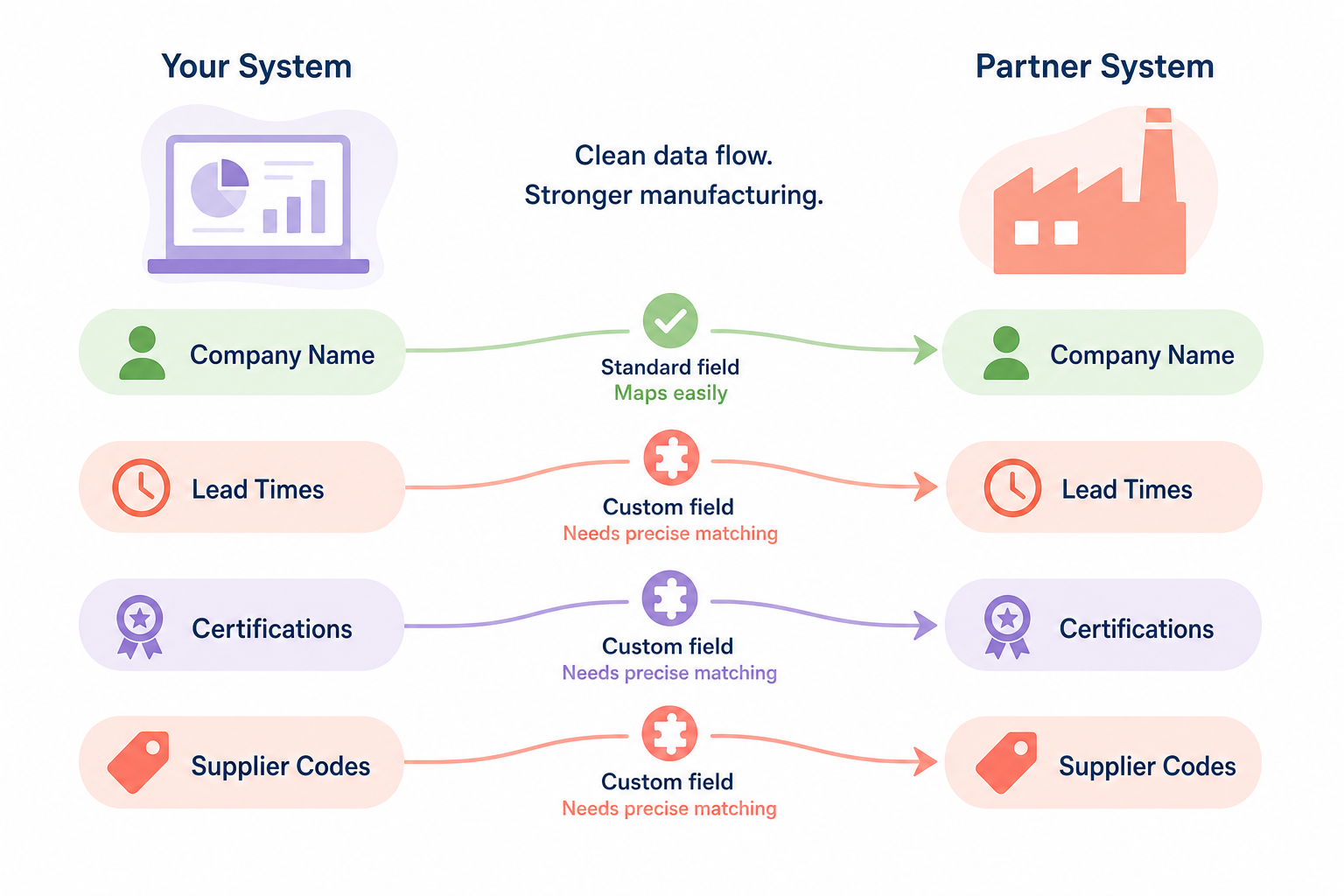
For manufacturers, standard fields like “Company Name” are straightforward, but custom fields like “Lead Times,” “Certifications,” or “Supplier Codes” require precise matching. Utilizing structured CRM field mapping for manufacturers ensures that technical details transfer without silent formatting errors.
Phase 3: Set your synchronization rules
Determine how data should move between systems. You must define:
- Frequency: Will data sync in real-time, on a set schedule (such as nightly), or when triggered by specific events?
- Direction: Is the sync one-way (from your email tool to the CRM) or bidirectional (updates in the CRM also update your ERP)?
- Conflict resolution: If two systems hold different information for the same contact, which system serves as the source of truth?
Phase 4: Test in a sandbox
Always configure and test your automated integrations in a sandbox or test environment first. Use realistic customer data sets to verify that the fields match up, check for data loss, and monitor how your systems perform under load before pushing the automation live.
Phase 5: Maintain and audit
Integration is not a one-time project. Schedule quarterly audits of your data quality, monitor API connection health, collect direct feedback from your sales reps, and update your workflows whenever software vendors release updates.
Using AI to eliminate data entry and enrich lead data
Artificial Intelligence has transformed CRM management from a retrospective record-keeping chore into an active, automated assistant. Instead of asking sales reps to type notes, you can use AI to manage routine data enrichment and pipeline updates.
Automated lead qualification and enrichment
Instead of requiring sales reps to research a new prospect’s company size, industry, and factory locations, you can automate this step by integrating CRM with automated lead generation systems.
AI engines can instantly scan corporate registries, websites, and professional networks to populate missing CRM fields. This ensures your sales team has rich firmographic data before they even make their first call.
Smart email and activity logging
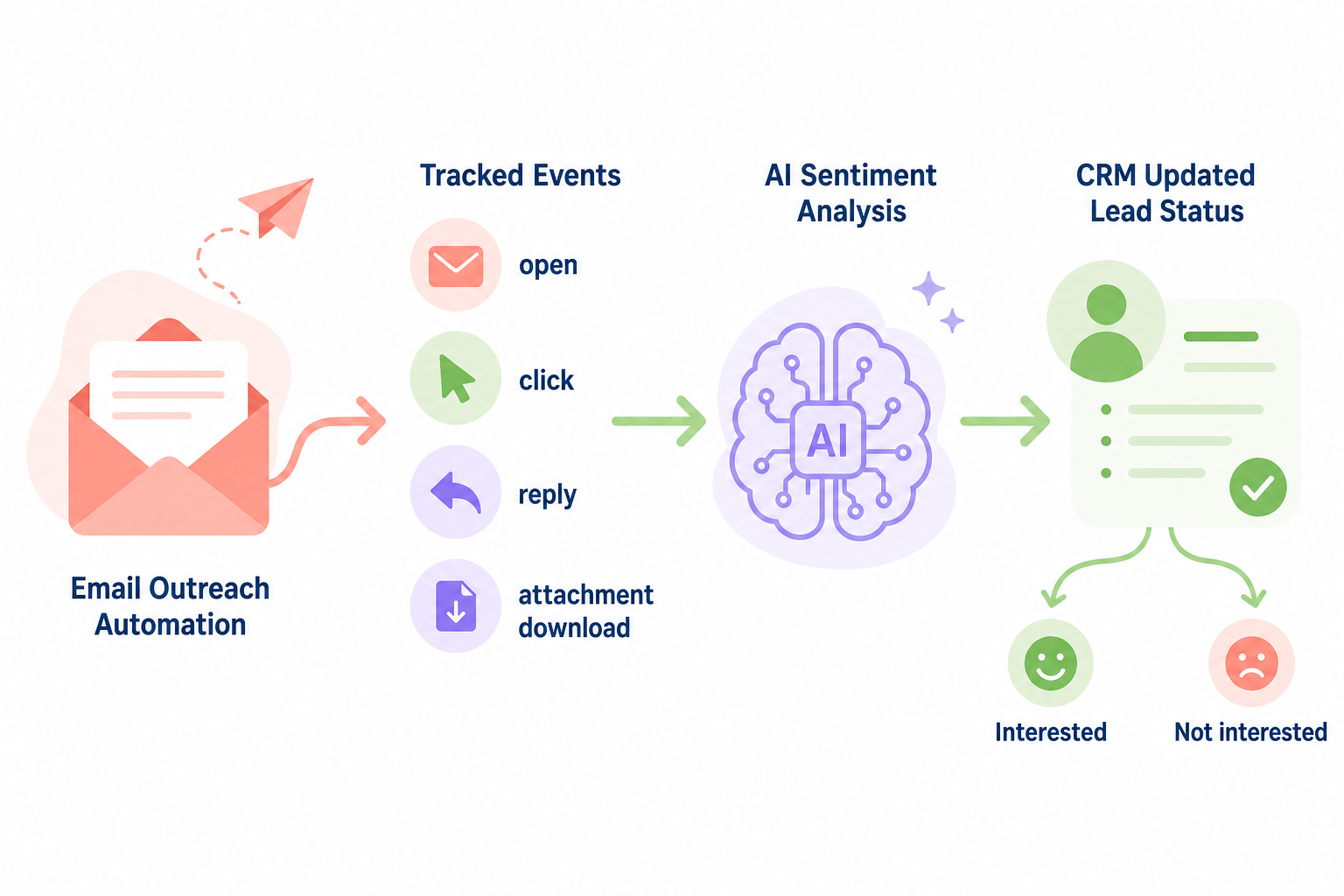
By integrating email outreach automation with CRM workflows, every email open, click, reply, and attachment download is tracked and logged inside the customer record without human intervention. AI can analyze email sentiment, automatically updating the lead status to “interested” or “not interested” based on the prospect’s reply.
Predictive scoring and triggers
You can configure your systems to use integrating CRM data with AI prospect insights to rank and prioritize leads. AI can score prospects based on web engagement or job updates, automatically triggering high-priority alerts for your sales team when a prospect shows active buying signals.
By integrating AI-driven tools into existing sales CRMs, your reps can shift away from manual administrative work entirely, focusing instead on high-value conversations and building direct buyer relationships.
Reclaiming your sales team’s time
Automating CRM data entry is more than an administrative upgrade. It protects your data integrity, ensures your production forecasts are accurate, and keeps your sales team focused on what they do best: building relationships and closing deals.
If you are ready to remove the burden of manual prospecting and data entry from your sales team, Sera can help. Sera’s AI-driven B2B outreach Autopilot uses six specialized AI agents working alongside human supervisors to build hyper-targeted lead lists, enrich prospect data, and write personalized outreach in over 100 languages.
Everything integrates smoothly into your sales ecosystem, keeping your pipeline filled with qualified meetings without the administrative headache. Learn how you can scale your growth by visiting Sera.