


Pipedrive uses a highly visual pipeline framework where each stage represents a concrete, real-world step your deals move through before they are won or lost. Instead of using vague labels like “In progress,” your pipeline should reflect your actual physical and commercial sales actions.
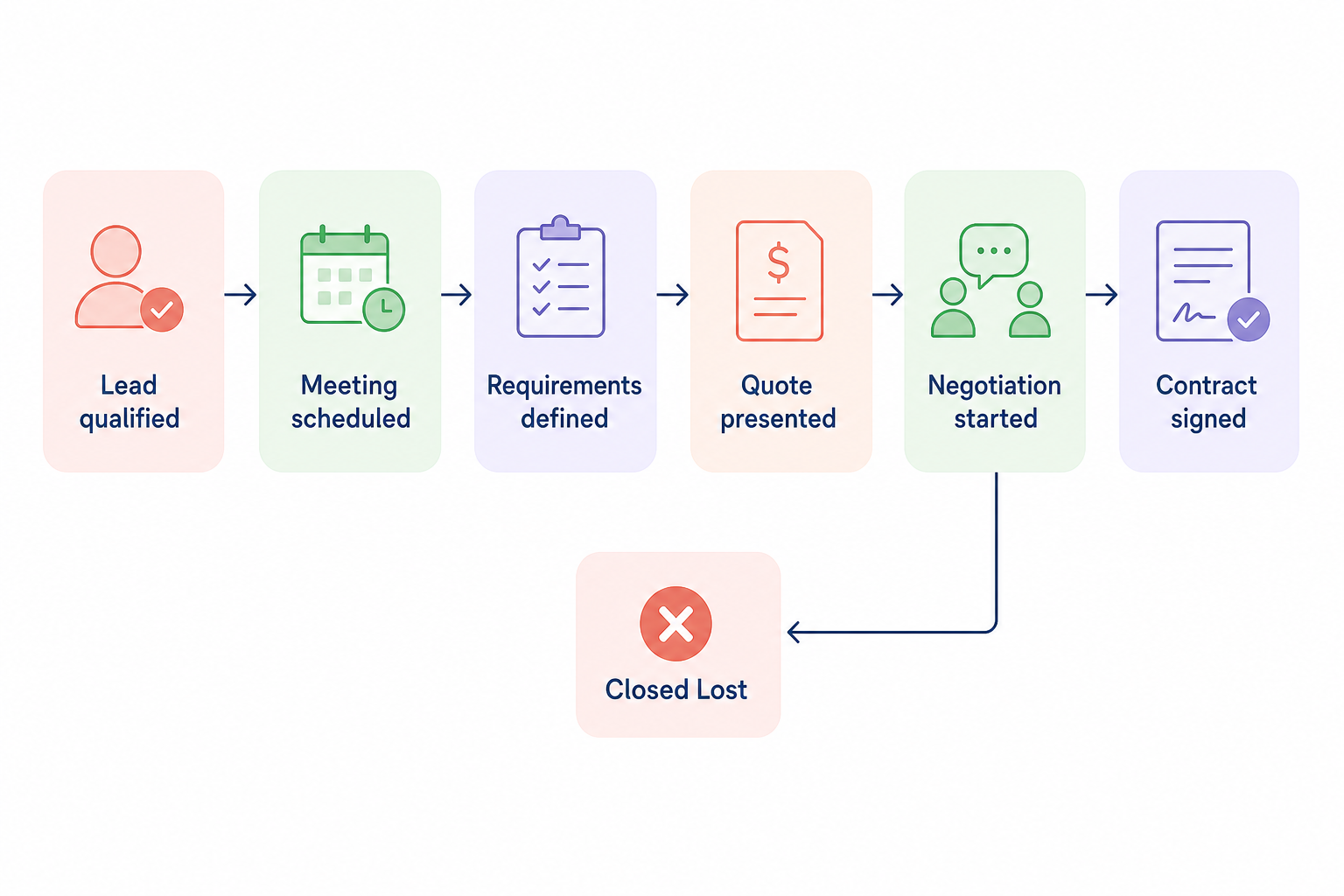
To keep your pipeline focused and easy for your team to manage, it is best to use fewer, highly defined stages. Your stage names should always be action-oriented and written in the past tense to maintain clear reporting milestones:
- Lead qualified: Confirming the prospect matches your ideal firmographic profile (e.g., annual revenue, production capacity, and industry sector).
- Meeting scheduled: Setting up the initial discovery call or site visit to discuss technical specifications.
- Requirements defined: Gathering custom blueprint details, bill of materials (BOM), and material preferences.
- Quote presented: Delivering the formal price estimate and production timeline.
- Negotiation started: Addressing objections regarding lead times, volume discounts, or shipping logistics.
- Contract signed: Finalizing the agreement and moving the deal to “Closed Won” before handing it off to the manufacturing floor.
Any opportunities that fall through should be marked as “Closed Lost.” Rather than abandoning these lost leads entirely, you can route them into a long-term nurturing campaign to stay top-of-mind for future facility upgrades or supplier changes. To ensure your baseline workflow is properly mapped, you can read more about how to create a sales workflow template to keep your sales engineers organized from day one.
Structuring multiple pipelines and stage probability
B2B manufacturing companies often manage vastly different sales motions. For example, your team might handle standard, high-volume catalog orders quite differently from long-term, custom OEM engineering contracts.
If your teams or products require different processes, you should create multiple pipelines in Pipedrive. However, avoid the temptation to move a single deal back and forth across different pipelines. Doing so can break your data reporting and distort your performance metrics in Pipedrive Insights.
To make your sales forecasting more accurate, you can assign a “stage probability” to each step. Once you have collected enough historical performance data, you can set a percentage indicating how likely a deal in that specific stage is to close. This helps manufacturing managers forecast upcoming production volumes and raw material requirements with confidence. To ensure your custom data transfers cleanly across your operations, read our guide on CRM field mapping for manufacturers.
Enforcing data quality with mandatory fields and rotting
In manufacturing sales, missing technical details can derail an entire production run. Pipedrive helps you protect data quality by letting you set mandatory fields. When a deal reaches a specific stage, Pipedrive will require your sales reps to input key details – such as estimated volume, material grade, or delivery deadline – before they can move the deal forward.
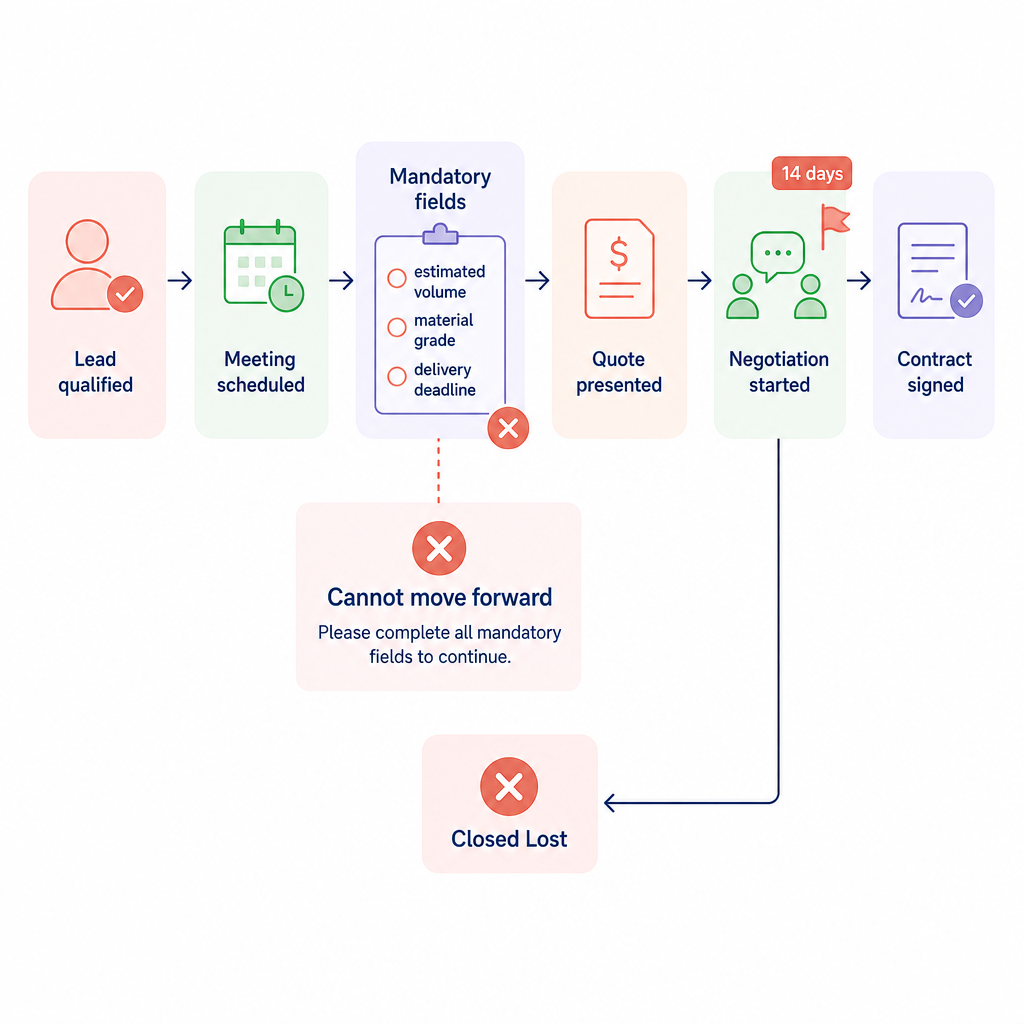
To prevent high-value quotes from gathering dust, you can also enable Pipedrive’s “rotting” feature. This tool automatically flags deals that have remained inactive in a particular stage for longer than a specified number of days. If a quote has been sitting in the negotiation stage for two weeks, the system will highlight it in red, alerting your sales rep to follow up immediately.
Automating stages with Pipedrive workflow automation
Setting up basic workflow automations in Pipedrive is a quick and intuitive way to eliminate repetitive manual work. Automations in Pipedrive run on straightforward “if-then” logic, which consists of two main elements:
- The trigger event (the “if”): A specific action that must happen first to launch the automation. This could be creating a new deal, updating an activity, or reaching a specific date (such as a contract renewal deadline).
- The action event (the “then”): What Pipedrive automatically does in response. This includes creating tasks, updating deal fields, or sending personalized emails directly from your synced email account.
By adding conditions and utilizing the built-in delay feature, you can schedule automations to run exactly when you need them. For instance, you can set up pipedrive workflow automation examples to automatically create a “follow-up call” task for a sales rep exactly three days after a quote is sent. To see how these tools work across different steps of your pipeline, explore our walkthrough on configuring sales automation for different sales stages.
Best practices for managing manufacturing sales workflows
Transitioning an old-school manufacturing sales team to an automated CRM workflow requires a practical, step-by-step approach. Focus on these core practices to ensure a smooth transition:
- Start small and scale up: Do not try to automate every task at once. Identify three to five key bottlenecks – such as manual follow-up emails or quote reminders – and automate those first. Review our guide on best practices for automating sales workflows to see how other industrial firms approach this.
- Track buyer engagement: Use pipedrive email tracking to see exactly when procurement officers open your proposals or click on your technical datasheets. This allows your team to time their follow-up calls perfectly.
- Integrate your core systems: Ensure your CRM is communicating with your ERP and scheduling systems. Following a step-by-step guide to CRM integration for sales will help you eliminate duplicate data entry and keep your engineers aligned with your sales reps.
- Involve your team in stage design: The best pipeline is the one your team actually uses. Involve your sales engineers when defining your pipeline stages to ensure the CRM matches the actual conversations they have on the factory floor.
Moving beyond basic CRM automation with AI
While standard pipedrive sales automation does an excellent job of organizing the deals you already have, it cannot find new prospects for you. For B2B manufacturers looking to expand into new markets or find new distributors, manual prospecting is often a massive time sink.
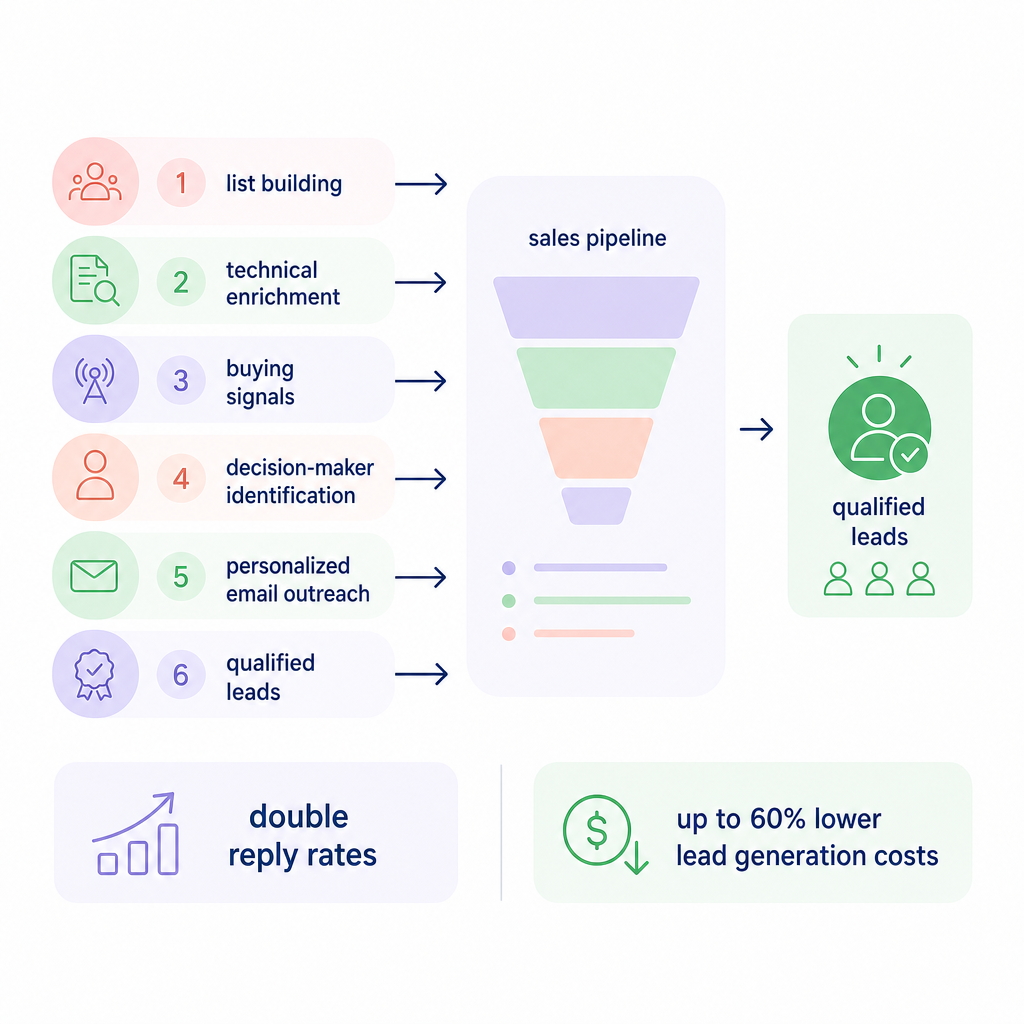
This is where AI-driven outbound outreach can support your team. Sera’s Autopilot uses six specialized AI agents working together as one to automate list building, technical enrichment, and personalized email outreach.
Instead of your sales reps spending hours searching LinkedIn or company databases, Sera’s agents identify the exact decision-makers at target manufacturing firms, check for relevant buying signals, and draft highly tailored, human-sounding outreach. This research-driven approach can double your reply rates while cutting lead generation costs by up to 60%, allowing your sales engineers to focus purely on configuring solutions and closing deals.
Setting up a structured Pipedrive pipeline gives your manufacturing sales team a clear, visual roadmap to close complex deals. By eliminating manual data entry and mapping your real-world sales process to clean CRM stages, you free your sales engineers to do what they do best: build relationships and design solutions.
To see how intelligent AI agents can automatically fill your Pipedrive pipeline with highly qualified manufacturing leads, book a demo with Sera today.